
1z0-060 Sample Questions & Answers
The heaviest area is day-to-day management of container and pluggable databases, followed by creating CDBs and PDBs, Enterprise Manager tooling, tablespace, user and privilege administration, backup and flashback recovery, auditing upgrades, and optimizer enhancements.
Launch the full 1z0-060 simulator →Showing 10 of 20 free samples.
- Question 1
On your Oracle 12c database, you issue the following commands to create indexes:
SQL> CREATE INDEX oe.ord_customer_ix1 ON oe.orders (customerjd, sales_rep_id);
SQL> CREATE BITMAP INDEX oe.ord_customer_ix2 ON oe.orders (customerjd, sales_rep_id);Which statement is correct?
Show answer & explanation
Correct answer: C
C
- Question 2
You are the DBA supporting an Oracle 11g Release 2 database and wish to move a table containing several DATE, CHAR, VARCHAR2, and NUMBER data types, and the table’s indexes, to another tablespace.
The table does not have a primary key and is used by an OLTP application.Which technique will move the table and indexes while maintaining the highest level of availability to the application?
Show answer & explanation
Correct answer: A
A--Explanation:
- Oracle Database provides a mechanism to make table structure modifications without significantly affecting the availability of the table. The mechanism is called online table redefinition. Redefining tablef^nline provides a substantial increase in availability compared to traditional methods of redefining tables.
- To redefine a table online: Choose the redefinition method: by key or by rowid
- By key—Select a primary key or pseudo-primary key to use for the redefinition. Pseudo-primary keys are unique keys with all component columns having NOT NULL constraints. For this method, the versions of the tables before and after redefinition should have the same primary key columns. This is the preferred and default method of redefinition. * By rowid—Use this method if no key is available. In this method, a hidden column named M_ROW$$ is added to the post-redefined version of the table. It is recommended that this column be dropped or marked as unused after the redefinition is complete. If COMPATIBLE is set to 10.2.0 or higher, the final phase of redefinition automatically sets this column unused. You can then use the ALTER TABLE ... DROP UNUSED COLUMNS statement to drop it.
You cannot use this method on index-organized tables.
Note: * When you rebuild an index, you use an existing index as the data source. Creating an index in this manner enables you to change storage characteristics or move to a new tablespace. Rebuilding an index based on an existing data source removes intra-block fragmentation. Compared to dropping the index and using the CREATE INDEX statement, re-creating an existing index offers better performance.
Incorrect answers:
E: Edition-based redefinition enables you to upgrade the database component of an application while it is in use, thereby minimizing or eliminating down time.
- Question 3Select 3
You performed an incremental level 0 backup of a database:
RMAN> BACKUP INCREMENTAL LEVEL 0 DATABASE;
To enable block change tracking after the incremental level 0 backup, you issued this command:
SQL> ALTER DATABASE ENABLE BLOCK CHANGE TRACKING USING FILE 7mydir/rman_change_track.f;
To perform an incremental level 1 cumulative backup, you issued this command:
RMAN> BACKUP INCREMENTAL LEVEL 1 CUMULATIVE DATABASE;
Which three statements are true? (Choose three.)
Show answer & explanation
Correct answers: B, C, E
B,C,E--Explanation:
A: In a cumulative level 1 backup, RMAN backs up all the blocks used since the most recent level 0 incremental backup.
E: Oracle Block Change Tracking Once enabled; this new 10g feature records the modified since last backup and stores the log of it in a block change tracking file using the CTW (Change Tracking Writer) process. During backups RMAN uses the log file to identify the specific blocks that must be backed up. This improves RMAN's performance as it does not have to scan whole datafiles to detect changed blocks. Logging of changed blocks is performed by the CTRW process which is also responsible for writing data to the block change tracking file.
Note: * An incremental level 0 backup backs up all blocks that have ever been in use in this database.B,C,E--Explanation:
A: In a cumulative level 1 backup, RMAN backs up all the blocks used since the most recent level 0 incremental backup.
E: Oracle Block Change Tracking Once enabled; this new 10g feature records the modified since last backup and stores the log of it in a block change tracking file using the CTW (Change Tracking Writer) process. During backups RMAN uses the log file to identify the specific blocks that must be backed up. This improves RMAN's performance as it does not have to scan whole datafiles to detect changed blocks. Logging of changed blocks is performed by the CTRW process which is also responsible for writing data to the block change tracking file.
Note: * An incremental level 0 backup backs up all blocks that have ever been in use in this database.B,C,E--Explanation:
A: In a cumulative level 1 backup, RMAN backs up all the blocks used since the most recent level 0 incremental backup.
E: Oracle Block Change Tracking Once enabled; this new 10g feature records the modified since last backup and stores the log of it in a block change tracking file using the CTW (Change Tracking Writer) process. During backups RMAN uses the log file to identify the specific blocks that must be backed up. This improves RMAN's performance as it does not have to scan whole datafiles to detect changed blocks. Logging of changed blocks is performed by the CTRW process which is also responsible for writing data to the block change tracking file.
Note: * An incremental level 0 backup backs up all blocks that have ever been in use in this database. - Question 4Select 2
Which two partitioning methods are suitable for a parent table when using reference partitioning in Oracle Database 12c? (Choose two.)
Show answer & explanation
Correct answers: B, C
B,C
B,C
- Question 5Select 3
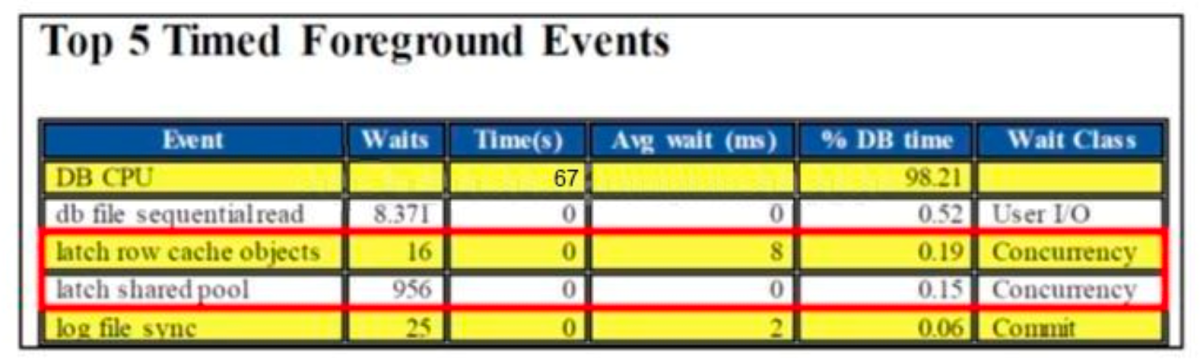
Examine the details of the Top 5 Timed Events in the following Automatic Workloads Repository (AWR) report:
What are three possible causes for the latch-related wait events? (Choose three.)
Show answer & explanation
Correct answers: A, C, E
A,C,E
A,C,E
A,C,E
- Question 6
You find this query being used in your Oracle 12c database:
select employee_id,first_name,salary
from hr.employees
order by employee_id
fetch first 20 percent rows only;Which method is used by the optimizer to limit the rows being returned?
Show answer & explanation
Correct answer: D
D
- Question 7
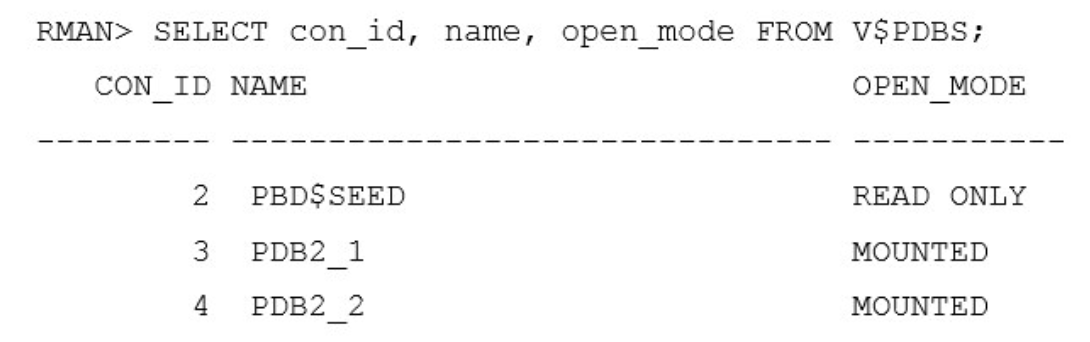
Your multitenant container database (CDB) is running in ARCHIVELOG mode. You connect to the CDB RMAN.
Examine the command and its output below.
You execute the following command: RMAN > BACKUP DATABASE PLUS ARCHIVELOG;
Which data files will be backed up?
Show answer & explanation
Correct answer: D
D--Explanation:
Backing Up a Whole CDB
Backing up a whole CDB is similar to backing up a non-CDB. When you back up a whole CDB, RMAN backs up the root, all the PDBs, and the archived redo logs. You can then recover either the whole CDB, the root only, or one or more PDBs from the CDB backup.
Note: * You can back up and recover a whole CDB, the root only, or one or more PDBs. * Backing Up Archived Redo Logs with RMAN
Archived redo logs are the key to successful media recovery. Back them up regularly. You can back up logs with BACKUP ARCHIVELOG, or back up logs while backing up datafiles and control files by specifying BACKUP ... PLUS ARCHIVELOG. - Question 8
You are connected to a pluggable database (PDB) as a common user with DBA privileges.
The STATISTICS-LEVEL parameter is PDB_MODIFIABLE.
You execute the following:
SQL> ALTER SYSTEM SET STATISTICS_LEVEL=ALL SID=‘*’ SCOPE=SPFILE;Which is true about the result of this command?
Show answer & explanation
Correct answer: D
D--Explanation:
docsBracle.com/database/121/ADMIN/cdb_pdb_admin. htm#">http://docs. oracle. com/database/121/ADMIN/cdb_pdb_admin.htm#ADMIN 14017 - Question 9
A database is stored in an Automatic Storage Management (ASM) disk group, DGROUP1, created with SQL.
There is enough free space in the disk group for mirroring to be done.
What happens if the CONTROLLER1 failure group becomes unavailable due to error or for maintenance?

Show answer & explanation
Correct answer: C
C
- Question 10Select 3
Which three are true about the large pool for an Oracle database instance that supports shared server connections? (Choose three.)
Show answer & explanation
Correct answers: A, D, E
A,D,E--Explanation:
The large pool can provide large memory allocations for the following: / (B)UGA (User Global Area) for the shared server and the Oracle XA interface (used where transactions interact with multiple databases) /Message buffers used in the parallel execution of statements / (A) Buffers for Recovery Manager (RMAN) I/O slaves
Note:- largepool
Optional area in the SGA that provides large memory allocations for backup and restore operations, I/O server processes, and session memory for the shared server and Oracle XA. - Oracle XA An external interface that allows global transactions to be coordinated by a transaction manager other than Oracle Database.
- UGA
User global area. Session memory that stores session variables, such as logon information, and can also contain the OLAP pool. - Configuring the Large Pool Unlike the shared pool, the large pool does not have an LRU list (not D). Oracle Database does not attempt to age objects out of the large pool. Consider configuring a large pool if the database instance uses any of the following Oracle Database features:
- Shared server In a shared server architecture, the session memory for each client process is included in the shared pool.
- Parallel query Parallel query uses shared pool memory to cache parallel execution message buffers.
- Recovery Manager Recovery Manager (RMAN) uses the shared pool to cache I/O buffers during backup and restore operations. For I/O server processes, backup, and restore operations, Oracle Database allocates buffers that are a few hundred kilobytes in size.
A,D,E--Explanation:
The large pool can provide large memory allocations for the following: / (B)UGA (User Global Area) for the shared server and the Oracle XA interface (used where transactions interact with multiple databases) /Message buffers used in the parallel execution of statements / (A) Buffers for Recovery Manager (RMAN) I/O slaves
Note:- largepool
Optional area in the SGA that provides large memory allocations for backup and restore operations, I/O server processes, and session memory for the shared server and Oracle XA. - Oracle XA An external interface that allows global transactions to be coordinated by a transaction manager other than Oracle Database.
- UGA
User global area. Session memory that stores session variables, such as logon information, and can also contain the OLAP pool. - Configuring the Large Pool Unlike the shared pool, the large pool does not have an LRU list (not D). Oracle Database does not attempt to age objects out of the large pool. Consider configuring a large pool if the database instance uses any of the following Oracle Database features:
- Shared server In a shared server architecture, the session memory for each client process is included in the shared pool.
- Parallel query Parallel query uses shared pool memory to cache parallel execution message buffers.
- Recovery Manager Recovery Manager (RMAN) uses the shared pool to cache I/O buffers during backup and restore operations. For I/O server processes, backup, and restore operations, Oracle Database allocates buffers that are a few hundred kilobytes in size.
A,D,E--Explanation:
The large pool can provide large memory allocations for the following: / (B)UGA (User Global Area) for the shared server and the Oracle XA interface (used where transactions interact with multiple databases) /Message buffers used in the parallel execution of statements / (A) Buffers for Recovery Manager (RMAN) I/O slaves
Note:- largepool
Optional area in the SGA that provides large memory allocations for backup and restore operations, I/O server processes, and session memory for the shared server and Oracle XA. - Oracle XA An external interface that allows global transactions to be coordinated by a transaction manager other than Oracle Database.
- UGA
User global area. Session memory that stores session variables, such as logon information, and can also contain the OLAP pool. - Configuring the Large Pool Unlike the shared pool, the large pool does not have an LRU list (not D). Oracle Database does not attempt to age objects out of the large pool. Consider configuring a large pool if the database instance uses any of the following Oracle Database features:
- Shared server In a shared server architecture, the session memory for each client process is included in the shared pool.
- Parallel query Parallel query uses shared pool memory to cache parallel execution message buffers.
- Recovery Manager Recovery Manager (RMAN) uses the shared pool to cache I/O buffers during backup and restore operations. For I/O server processes, backup, and restore operations, Oracle Database allocates buffers that are a few hundred kilobytes in size.
- largepool
Ready for the real thing?
The full 1z0-060 simulator has every exam-style question, timed mode, and instant scoring.