
Checking the AWS certification retake policy waiting period comes before choosing your next exam date. I’d handle the booking in six stages: confirm eligibility, open the right account, select the exam, choose an appointment, review payment, and verify the reservation. Follow that sequence below, with a separate check at each stage.
The current waiting-period length, retake fees, and booking-screen labels aren’t verified in this guide. Confirm those details against the current AWS policy and the terms presented during booking. In particular, don’t treat a commonly repeated number, including 14 days, as confirmation of your own eligible date.
1. Confirm the waiting period for your failed exam
Start by establishing when you’re eligible to attempt the same AWS exam again. Keep this administrative check separate from deciding whether you feel ready.
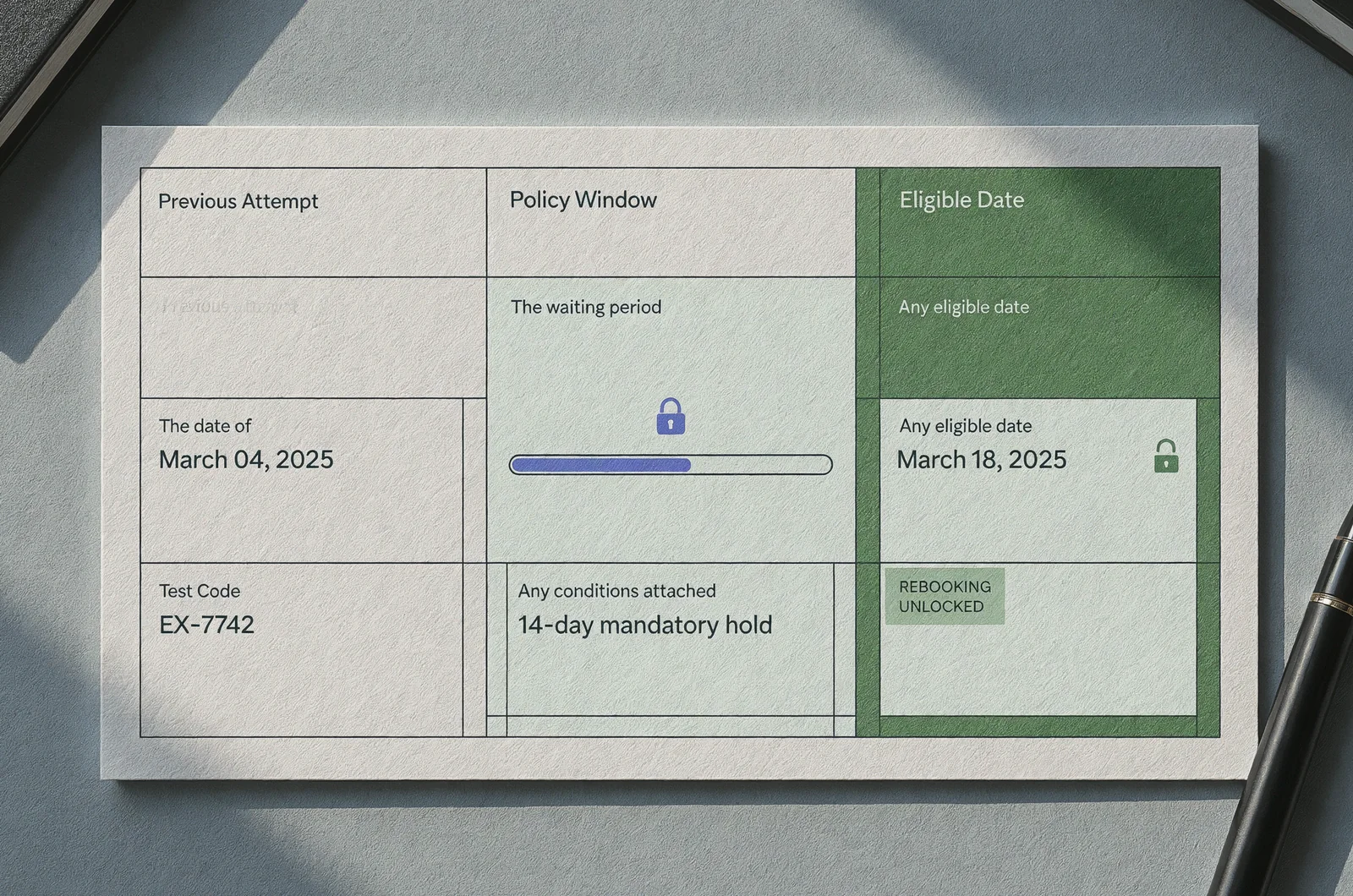
Record the applicable rule and date
Open the current AWS Certification retake policy through your certification account or an official AWS Certification page. Look specifically for the rule covering an unsuccessful attempt at the exam you intend to retake.
Write down:
- The date of your previous attempt.
- The waiting period stated in the current policy.
- Any conditions attached to that rule.
- Any eligible date or restriction displayed in your account.
Distinguish the policy wording from your own calendar calculation. If the account displays an eligible date, compare it with your calculation before arranging time away from work.
If the wording leaves a timing question unresolved, ask support to confirm it. For example, request the earliest eligible appointment date rather than asking whether “two weeks should be enough.”
Keep a copy of the policy wording with the date you checked it. Use that record when discussing any discrepancy with support.
Choose a study target after confirming eligibility
Treat the earliest eligible date as a planning boundary. Choose your preferred appointment separately, based on what you intend to review before sitting again.
Before selecting that date, review your previous results. For help organizing that review, consult the AWS diagnostic score report guide.
Write one concrete preparation goal beside your proposed date. For example, you might decide to explain your weakest topic without notes before booking. Keep that goal specific enough to check during your next study session.
2. Open the certification account from your earlier attempt
Use the account associated with your previous AWS exam attempt as your starting point. Check its details before moving into another booking flow.
Find your exam history or results area and look for the attempt you intend to follow up. Compare the exam name and attempt date with your own records. If the account doesn’t show the expected history, investigate that mismatch before entering payment details.
Next, review the personal information displayed in the account. Compare your name with the identification requirements presented for the appointment you intend to book. Follow the current correction process if something needs attention.
Avoid creating another account simply to get past a restriction. Instead, resolve the original account’s history or eligibility question through the available support route.
Find the option for scheduling or managing certification exams, then follow the booking route provided there. Treat the wording on your actual screen as the instruction to follow; don’t search indefinitely for a button mentioned in an older walkthrough.
If the flow transfers you to Pearson VUE, check that the destination identifies the intended AWS exam program and your candidate details. If either looks wrong, stop and return to your certification account.
Finish this stage with three things aligned: your identity, your previous attempt, and the exam program shown in the booking flow.
3. Select the exact exam you intend to retake
Choose the AWS exam deliberately, even if its name looks familiar. Compare the booking selection with your preparation materials before continuing.
Match the title and identifier
Read the full exam title and any identifier displayed beside it. Compare those details with the current exam information available through the official certification program.
If a version or identifier differs from your earlier attempt, investigate that difference before paying. Check which exam is available for your intended appointment and which preparation materials you should use.
Keep the distinction between a certification name and a particular exam selection clear in your notes. Copy the exact booking title rather than shortening it to something like “AWS associate.”
Then open your study plan and compare its scope with the exam you selected. For an overview to support that review, use the AWS exam domain breakdowns.
Review every selectable exam detail
If the booking flow presents a language choice, select it deliberately. Read the confirmation screen afterward instead of relying on the initial selection.
Apply the same approach to any other exam-specific choices. Review what the screen actually presents and follow the accompanying instructions.
Write down the exact exam title, identifier, and selected language before moving to appointment selection. Use those details as your comparison points at checkout.
If you use ExamJungle during preparation, make the same comparison with the practice material you select. Keep your booking details beside your study plan and resolve any mismatch before continuing.
4. Choose the delivery method and appointment time
Select an appointment only after checking the delivery choices available for your exam. Review the requirements attached to each option presented.
Review the conditions for your chosen setting
If the flow presents a test-center appointment, inspect the location details before selecting a time. Check the address and read the arrival and identification instructions provided for that location.
Plan the journey using that address. Include your intended departure time, transport arrangements, and any work commitments that need adjustment.
If online delivery is available, review its current requirements before choosing it. Work through any required system check and read the instructions for the computer, room, identification, and check-in process.
Use the actual equipment and setting you intend to use wherever the instructions call for a check. If something remains unresolved, investigate it before committing to the appointment.
Choose the setting whose requirements you can meet and whose appointment fits your preparation plan. Record any unfinished setup task immediately.
Verify the date, time, and time zone
Read the complete appointment date and time before advancing. Include the displayed time zone in your notes.
For a hypothetical example, suppose you prefer a Tuesday evening appointment after work. Check the complete date and displayed time zone against your own calendar before selecting it. Then review any check-in instructions separately.
Consider the hours around the appointment as well. Leave room for the preparation and arrival steps stated in the booking instructions.
If your preferred slot isn’t available, reassess the alternatives against your study goal. You can choose a later date rather than treating the first available appointment as your deadline.
Before continuing, read your selection aloud: exam, delivery method, location if applicable, date, time, and time zone. Compare each item with the screen.
5. Review the payment and any retake offer
Inspect the payment terms for this specific AWS appointment before submitting an order. Use the amount and conditions displayed for your booking.
Check a voucher or promotion on its own terms
If you have a voucher, employer benefit, or advertised retake offer, open its terms before applying it.
Check whether those terms cover:
- Your selected exam.
- Your intended booking and appointment dates.
- Your previous purchase or registration, if relevant.
- The region or currency shown at checkout.
- Any required redemption steps.
If the terms are unclear, ask the issuer to confirm eligibility for your specific appointment. Keep its response with your booking records.
After entering a code, inspect the resulting order summary. Require the expected adjustment to appear before you proceed.
Don’t assume your earlier payment includes another attempt. Confirm any entitlement through the applicable offer terms or account record.
Read the complete order summary
Review the total amount, currency, and any separate charges displayed. Compare the final total with the payment arrangement you intend to use.
If your employer is paying, settle the approval and receipt requirements before submitting the order. Record any information you need to retain for reimbursement.
Read the cancellation and rescheduling terms presented for the appointment. Save the applicable deadlines and instructions with the payment details.
If the total or terms differ from what you expected, pause at checkout and resolve the discrepancy.
Submit payment only after the selected exam, appointment, and amount all match your notes. Continue through the remaining screens and look for explicit appointment confirmation.
6. Verify that the appointment is recorded correctly
Use a completed appointment record as your booking check. Compare that record with the choices you made before payment.
Look for the exact exam title, selected language, delivery method, date, time, and time zone. For a test-center appointment, compare the address too.
Check the appointment in your account and review any confirmation message you receive. If those records disagree, ask the booking provider to resolve the discrepancy before you arrange around either version.
Save the appointment identifier and confirmation details somewhere accessible. Keep any receipt alongside them, particularly if you need reimbursement.
Create a calendar entry from the confirmed details. Include the time zone and any arrival or check-in instruction stated in the confirmation.
Read the appointment instructions once more and record unfinished tasks. Those might include reviewing identification requirements, completing a required equipment check, or confirming transport.
If the terms specify a deadline for changes, add a separate reminder ahead of that deadline. Keep the exact wording available rather than reducing it to “change booking sometime this week.”
For your final check, reopen the appointment record and compare it with your calendar entry. Resolve any difference in date, time, location, or delivery method immediately.
When the AWS retake booking won’t go through
Identify the stage that stopped you before trying the booking again. Separate an eligibility question from an account, appointment, or payment problem.
An eligibility restriction still appears
Return to the policy wording and attempt details you recorded earlier. Compare them with the restriction shown in your account.
Capture the exact message and the date you saw it. Include the exam identifier and previous attempt date in your support request.
Ask support to confirm the earliest eligible appointment date and explain any restriction that remains. Keep the request focused on the discrepancy you can document.
If you’re unsure how the waiting period applies, leave that question open until you receive clarification. Don’t describe a calendar estimate as confirmed eligibility.
The account or exam details don’t match
Stop if the booking flow shows an unfamiliar account, missing history, or unexpected exam selection.
Return to the account details and compare them with your earlier confirmation records. Follow the available account-support process to resolve the mismatch.
Avoid paying for another selection while the original question remains unresolved. Ask support which account and exam record you should use.
Checkout stops without a clear result
Check your account for an appointment record before submitting another payment. Review any confirmation or error message from the interrupted transaction.
Record what happened, including the approximate time and any transaction reference. Use the provider’s support route to clarify the payment and appointment status.
Keep passwords, verification codes, and full payment-card details out of support messages. Provide only the information requested through the appropriate support channel.
Resume booking after you understand whether an appointment exists and what action remains.
Plan the preparation between booking and exam day
Once you’ve established your eligible date, assign the remaining preparation time to specific tasks. I’d start with the topics you want to explain more clearly on the next attempt.
Turn each study session into a checkable task
Write a short list of concepts to revisit. For each one, choose an action: review the relevant material, work through a scenario, or explain a decision in your own words.
Keep the list tied to the exam you selected. Resist adding unrelated topics simply because they appear in a broad cloud course.
For help assessing preparation options, consult the AWS practice exams guide. Evaluate any material against your selected exam and current study needs.
When practicing in ExamJungle, give each session a defined review task. For example, explain your choice and identify the condition that would make another answer appropriate.
Afterward, record the concept that still needs work. Assign it a specific place in your next session.
Keep appointment administration visible
Put unfinished booking tasks beside your study plan. Complete each one according to the instructions attached to your appointment.
A useful interactive checklist could place your confirmed eligible date, selected appointment, and unfinished preparation tasks on one screen. Keep the waiting-period value editable and attach the official rule you used; don’t have the checklist assume a policy value.
Review your preparation plan before any deadline for changing the appointment. Decide whether to keep the date based on the work you’ve completed and the terms governing changes.
Questions to settle before your AWS retake
Use these questions to check the assumptions behind your booking. Take unresolved policy questions to the official program or booking provider.
Can I assume the waiting period is 14 days?
Verify that number against the current AWS retake policy before using it to plan an appointment. This guide does not establish a verified waiting-period length.
Record the applicable rule and compare it with your account’s eligibility information. If they appear inconsistent, ask support for the earliest eligible date for your specific exam.
Keep any answer with your booking notes.
Does my previous payment include another attempt?
Check the purchase terms, voucher conditions, or promotion attached to your original booking. Treat a free or discounted retake as unconfirmed until you can identify the applicable entitlement.
If you have an offer, follow its redemption instructions and inspect the final amount before submitting payment.
Save the relevant terms with the new appointment record.
Should I book the earliest eligible appointment?
Choose a date after reviewing both eligibility and your preparation plan. I’d use a concrete readiness check, such as explaining a previously difficult concept without referring to notes.
If you choose the earliest available appointment, assign the remaining study tasks before committing. If you choose a later date, set intermediate review sessions now.
Check the appointment-change terms before relying on the option to move it later.
Can I switch between online and test-center delivery?
Check the choices presented for your selected exam and read the terms governing an existing appointment. Don’t assume a change is complete after merely selecting another delivery option.
Follow the applicable process, then inspect the resulting appointment record. Verify the delivery method, date, time zone, and any location details again.
Keep the updated confirmation with your calendar entry.
Strengthen the study plan for your next AWS attempt