
Microsoft Certification Exam Price Changes 2026
Microsoft has kept its certification exam prices unchanged in the U.S. since late 2024. Fundamentals exams (e.g., AZ-900, AI-900) remain at $99, while Associate, Expert, and Specialty certifications cost $165 per attempt. Fundamentals certifications offer lifetime validity, while advanced certifications require annual renewal, which is free through an online assessment.
Key Updates for 2026:
- New AI-focused certifications introduced, such as AB-900 and AB-100.
- AI content added to all Fundamentals exams and 23 role-based certifications, updating 15–20% of exam content.
- International pricing adjustments: Canada and Australia see reduced fees, while some regions like South Africa experience increases.
Additional Notes:
- Retakes cost the same as the original fee.
- Free training options and discounts, such as Microsoft Virtual Training Days and student pricing, can help reduce costs.
- Microsoft 365 subscription prices will rise by 5% to 33% starting July 1, 2026, but this does not impact exam fees.
Proper preparation is crucial to avoid retake costs, with free resources like Microsoft Learn and tools like PlanetCert offering practice tests and study materials.
Microsoft Certification Price Changes as of November 1st 2024
2026 Microsoft Certification Exam Prices
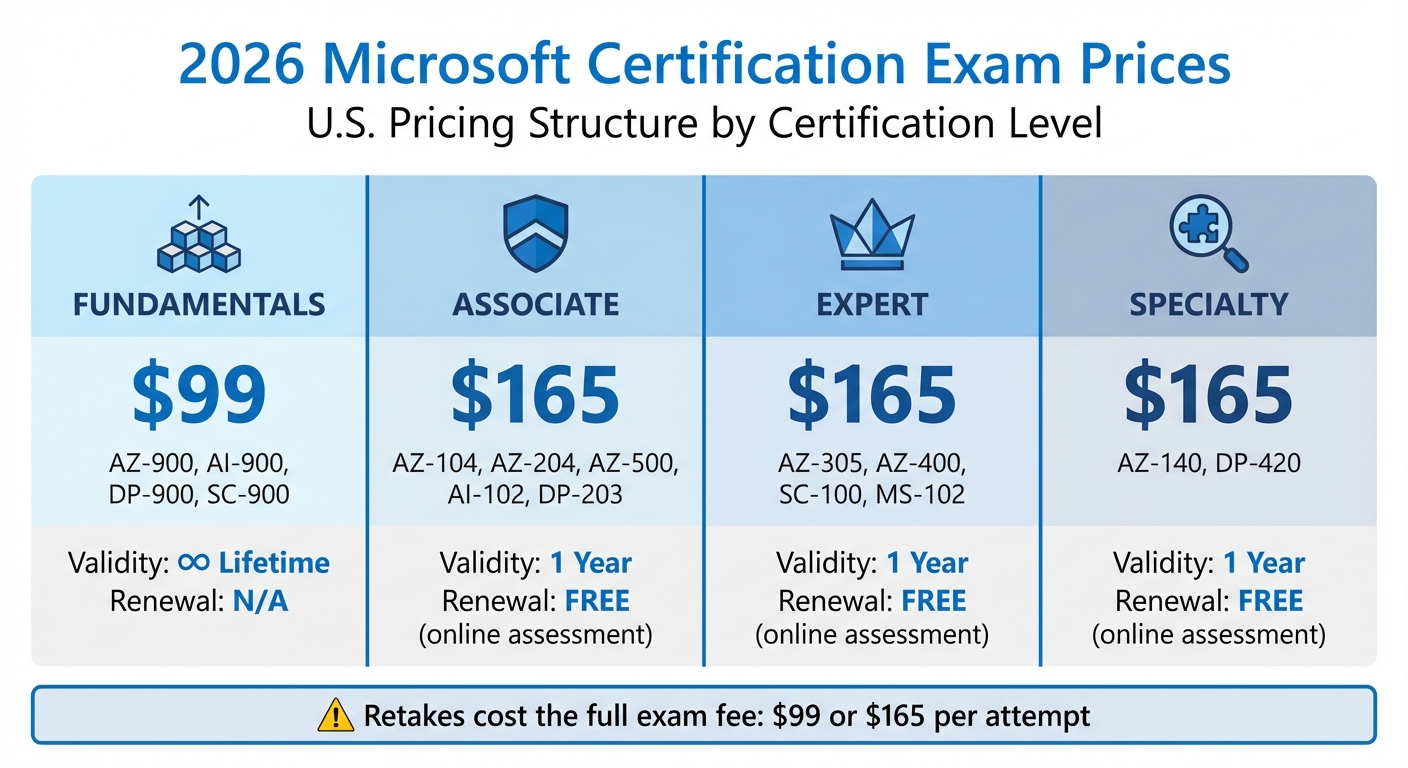
Microsoft Certification Exam Pricing Structure 2026 by Level
Pricing by Certification Level
Microsoft uses a straightforward two-tier pricing system for certification exams in the United States. This pricing model has been in place since late 2024 and applies to all certification levels.
- Fundamentals exams (like AZ-900 and AI-900) are priced at $99 and come with lifetime validity.
- Advanced certifications (Associate, Expert, and Specialty levels) cost $165 per attempt and are valid for one year. However, renewal is free through an unproctored assessment available on Microsoft Learn.
These prices act as the baseline before any regional adjustments for local markets and currencies.
US Pricing Structure
In the United States, exam fees are set at the standard global rates, with all charges listed in USD. This serves as the reference point for other regions, which may adjust prices based on economic factors.
If you need to retake an exam, you'll have to pay the full fee again - either $99 for Fundamentals or $165 for Advanced levels. This makes solid preparation essential to avoid additional costs.
Certification Price Comparison Table
| Level | Examples | 2026 US Price | Validity |
|---|---|---|---|
| Fundamentals | AZ-900, AI-900, DP-900, SC-900 | $99 | Lifetime |
| Associate | AZ-104, AZ-204, AZ-500, AI-102, DP-203 | $165 | 1 Year (Free Renewal) |
| Expert | AZ-305, AZ-400, SC-100, MS-102 | $165 | 1 Year (Free Renewal) |
| Specialty | AZ-140, DP-420 | $165 | 1 Year (Free Renewal) |
Which Certifications Are Affected
Exams with Price Changes
From 2024 to 2026, U.S. exam pricing stays the same. But by 2026, the term "affected" shifts focus from pricing to major updates in exam content - specifically the inclusion of AI across certifications.
All Microsoft Fundamentals exams - like AZ-900, MS-900, SC-900, PL-900, and AI-900 - will feature AI-related content starting in 2026 [9]. Additionally, 23 role-based exams will see AI elements integrated, with each exam undergoing a 15–20% content update [9]. Certifications such as AZ-104 (Azure Administrator), AZ-500 (Security Engineer), and AZ-305 (Solutions Architect Expert) will include 12–18% AI-focused questions [9].
In 2024, 14 certifications were retired or consolidated, requiring candidates to transition to updated versions [9]. Looking ahead, new specialized certifications like AB-210 (AI-Powered Sales), AB-610, and AB-62 will debut in early 2026.
While U.S. pricing remains steady, international markets are experiencing a mix of increases and decreases.
Exams with Stable Pricing
Although U.S. pricing remains unchanged, international adjustments vary. For instance, exam fees in Canada and Australia have dropped - from $99 to $84 for Fundamentals exams and from $165 to $140 for Advanced certifications [5]. In Ukraine, Fundamentals exams are now priced at $44 and Advanced exams at $58, reflecting a 20% reduction aimed at increasing accessibility [2][5]. Meanwhile, South Africa saw a slight rise in costs for advanced certifications [5].
For professionals in the U.S., stable pricing offers predictability. Fundamentals certifications like AZ-900 remain priced at $99 with lifetime validity. Associate, Expert, and Specialty certifications hold their $165 price tag, with free annual renewals available through online assessments on Microsoft Learn [8].
sbb-itb-119ea25
How to Budget for Microsoft Certifications
Beyond the Exam Fee: Other Costs
When planning for Microsoft certifications, it’s important to consider more than just the exam fee. Costs can add up quickly when you factor in retakes, study materials, and optional training. For example, retaking an exam means paying the full fee again - $99 for Fundamentals or $165 for Advanced certifications [4][6]. Additionally, you might need to spend on practice exams, study guides, video courses, hands-on labs, or instructor-led training sessions.
Here’s a quick breakdown of potential costs:
| Cost Component | Estimated Range (USD) | Frequency |
|---|---|---|
| Official Exam Fee | $99 - $165 | Per attempt |
| Exam Retake Fee | $99 - $165 | Per failed attempt |
| Practice Exams | $20 - $120 | Per certification |
| Study Guides/Books | $30 - $60 | Optional |
| Video Training Courses | $15 - $200 | Optional |
| Hands-on Labs/Azure Credits | ~$20 | Monthly (after trial) |
| Instructor-Led Training | $1,295 - $2,395 | Optional |
| Certification Renewal | $0 | Annual |
Ways to Reduce Certification Costs
There are several ways to cut down on certification expenses without compromising your preparation. Microsoft Virtual Training Days, for instance, offer free webinars that come with a 100% discount voucher for Fundamentals exams [4][6]. Students can also save 50% on exam fees by verifying their academic status through Microsoft Learn [4][6]. If your employer participates in the Microsoft Enterprise Skills Initiative (ESI), you may be eligible for free exam vouchers and practice exams [6].
Another cost-saving option is Microsoft Learn, which provides free training modules that can replace pricey third-party courses [4]. The platform also includes free Practice Assessments to help you evaluate your readiness before booking an exam [2]. Keep an eye out for beta exam announcements, which often come with an 80% discount [6].
Don’t forget to check with your employer - many companies have learning and development budgets that cover certification costs. This can be a huge help, especially for pricier components like instructor-led training [4].
To avoid paying for retakes, aim to score at least 80% on practice tests before sitting for the real exam [6]. Once you’ve passed, role-based certifications can be renewed annually for free through online assessments, saving you from paying the $165 exam fee again [4][6][10]. With careful planning and smart use of discounts, you can manage your certification expenses effectively.
Exam Preparation Tools and Methods
Using PlanetCert for Microsoft Exams
Getting ready for Microsoft certification exams involves more than just skimming through documentation. PlanetCert offers a well-rounded preparation platform that includes practice tests and simulators designed to mimic the actual exam setting. Whether you're tackling Fundamentals (900-series) or Expert-level certifications, PlanetCert covers the entire Microsoft certification range and provides detailed explanations for every question.
What sets PlanetCert apart is its focus on hands-on, practical skills rather than just memorization. The platform also uses AI-powered tools to break down complex topics like Azure architecture and security frameworks, making challenging subjects easier to grasp.
To make your preparation even more effective, PlanetCert offers multiple study modes tailored to various learning styles.
PlanetCert Study Modes Explained
PlanetCert features four distinct study modes to guide you through every phase of your exam prep. The Exam Simulator replicates the real test environment, complete with timed sections, labs, and case studies that mirror the tasks you'll face on exam day. This is especially useful since Microsoft lab tasks often take significantly longer to complete than standard multiple-choice questions [3].
In Study Mode, you can learn at your own pace, with instant feedback and explanations that align with key exam objectives [3]. Flashcard Mode helps reinforce concepts through quick reviews, while Review Mode allows you to analyze previous attempts and spot recurring mistakes. Given that Microsoft exams typically lock you out of case study sections once you move forward [3], practicing with these modes builds the confidence and decision-making skills you'll need under pressure.
These diverse study modes not only familiarize you with the exam format but also prepare you to face the challenges without feeling overwhelmed.
How to Avoid Retakes
Nobody wants to shell out another $99 or $165 for a retake, so tracking your progress and scheduling your exam only when you're consistently scoring well on practice tests is key. High scores on practice assessments are a strong indicator of exam readiness [3]. PlanetCert's progress tracking and peer benchmarking tools can help you pinpoint weak areas and address them before they become costly mistakes.
It's also smart to focus your study efforts on the most heavily weighted skills, as Microsoft assigns more points to certain objectives [3]. For Expert-level exams like AZ-305, plan to spend 3–6 months gaining real-world experience and honing your ability to solve scenario-based problems [1]. Don't rush to schedule your test until your practice scores consistently show you're ready. Keep in mind, Microsoft doesn’t issue refunds for failed attempts, and retakes require either a 24-hour wait for the first retry or a 14-day wait for subsequent ones [3][7][11].
Summary of 2026 Price Changes
Microsoft's pricing structure for 2026 builds on the global framework introduced in late 2024, aiming to maintain consistent pricing across regions while considering local market conditions. These adjustments reflect Microsoft's focus on balancing accessibility with consistency, all while incorporating new AI-driven certification content.
To avoid the expense of retaking exams, tools like PlanetCert can be a game-changer. With over 1,000,000 practice questions, an Exam Simulator, and detailed progress tracking, PlanetCert ensures candidates are well-prepared before booking their tests. Since Microsoft allows only two scheduled exams at a time [3], careful preparation becomes a practical and cost-saving approach.
The addition of new AI and Cybersecurity credentials highlights Microsoft's priority on advancing technical expertise while keeping pricing stable. Among the new offerings are AB-series exams for AI-powered Dynamics 365 and certifications tailored for business users focusing on security [5]. As Microsoft puts it:
"Earning a Certification is an investment in your professional life that can pay off in many ways, helping you build your skills and enhance your career" [2].
FAQs
Will Microsoft exam prices go up in the U.S. in 2026?
Starting November 1, 2024, Microsoft will raise the prices of its certification exams in the United States. This adjustment reflects changes in their certification offerings and overall pricing strategy. If you're planning to earn a Microsoft certification, it’s a good idea to factor this price increase into your budget.
How do free renewals work for Associate, Expert, and Specialty certifications?
AWS now offers free renewals for Associate, Expert, and Specialty certifications, giving eligible individuals the chance to extend their credentials without any cost. To qualify, you’ll generally need to maintain an active certification status or fulfill certain criteria. Since requirements can differ, it’s best to review the official guidelines to stay informed about the specifics.
What should I study if AI is being added to my Microsoft exam?
When preparing for your exam, it's essential to concentrate on key AI concepts, especially how they connect with Microsoft services, security measures, governance practices, and architectural frameworks. These areas have been incorporated into the updated certification content, making them critical for your study plan.
Take time to review the latest exam objectives thoroughly. This will help ensure you're ready to tackle the new topics and understand how AI is integrated into Microsoft's ecosystem.