If “packet tracer vs physical lab hardware ccna” is your study-planning question, my recommendation is to begin with Packet Tracer and justify any hardware purchase against a specific task. Make the decision around what you need to practice, what your setup actually supports, and how consistently you can use it.
I’d rank the five tradeoffs in this order: objective coverage, total budget, daily convenience, troubleshooting practice, and readiness assessment. Use that order to decide whether equipment deserves a place in your study plan.
Treat these recommendations as a decision framework. Before spending money, confirm the current Cisco exam objectives, your software’s supported functions, and the exact capabilities and licensing conditions of any equipment you’re considering.
You deserve a clear reason for each study purchase. Set your buying threshold now: name the exercise, describe the limitation you’ve encountered, and explain what the proposed equipment would let you do. Then work through the five comparisons below.
1. Objective coverage: choose the setup that supports your actual exercises
Put coverage first when comparing Packet Tracer with physical equipment. I’d favor whichever setup lets you complete a verified study task and explain the result. Begin by matching exercises to the exam objectives you intend to study.
Turn each objective into something you can demonstrate
Take the current official objective list and build a small practice record. For each relevant topic, write down the required action, your proposed exercise, and the evidence you’ll use to judge your work.
For an objective that asks you to configure something, propose a configuration task. Where it asks you to interpret output, prepare an explanation exercise. Keep the wording close to the published requirement.
Try this sequence with a topic you have confirmed belongs in your study plan:
- Write the intended network behavior before opening the lab.
- Build the smallest topology needed for the exercise.
- Complete the task without following a finished configuration.
- Collect the output you would use to verify your work.
- Explain one incorrect configuration and its expected consequence.
Apply the same standard to both options. If Packet Tracer lets you perform the exercise and inspect the evidence you need, keep using it for that task. If you encounter a limitation, record it precisely.
Avoid treating unfamiliar syntax as proof of a software limitation. Check your command context and the relevant documentation before making a buying decision.
Require a specific answer from any hardware purchase
For physical equipment, identify the exact model, installed software, interfaces, and permissions your proposed exercise requires. Ask the seller or equipment owner to confirm those details before you commit.
Use a narrow question: “Can this particular device complete this particular exercise with its existing configuration and software?” Request supporting documentation or suitable output where appropriate.
Give the software option the same scrutiny. Check the device model and functions available in your installed version. Reproduce the problem in a clean file before deciding that an exercise is unavailable.
My recommendation is to stay with Packet Tracer wherever you can demonstrate the required work. Add hardware when you have verified a relevant capability gap and identified equipment that addresses it.
Keep a separate category for topics you still need to read about or explain. Assign each objective an appropriate study activity instead of forcing every topic into a lab.
Finish this comparison with a written list of supported exercises, unresolved limitations, and any hardware capabilities you still need to verify.
2. Total budget: compare complete study setups
For the budget tradeoff, I’d compare the full commitment required by each proposed setup. Set a spending ceiling before browsing equipment listings, then reserve money for the rest of your certification plan.
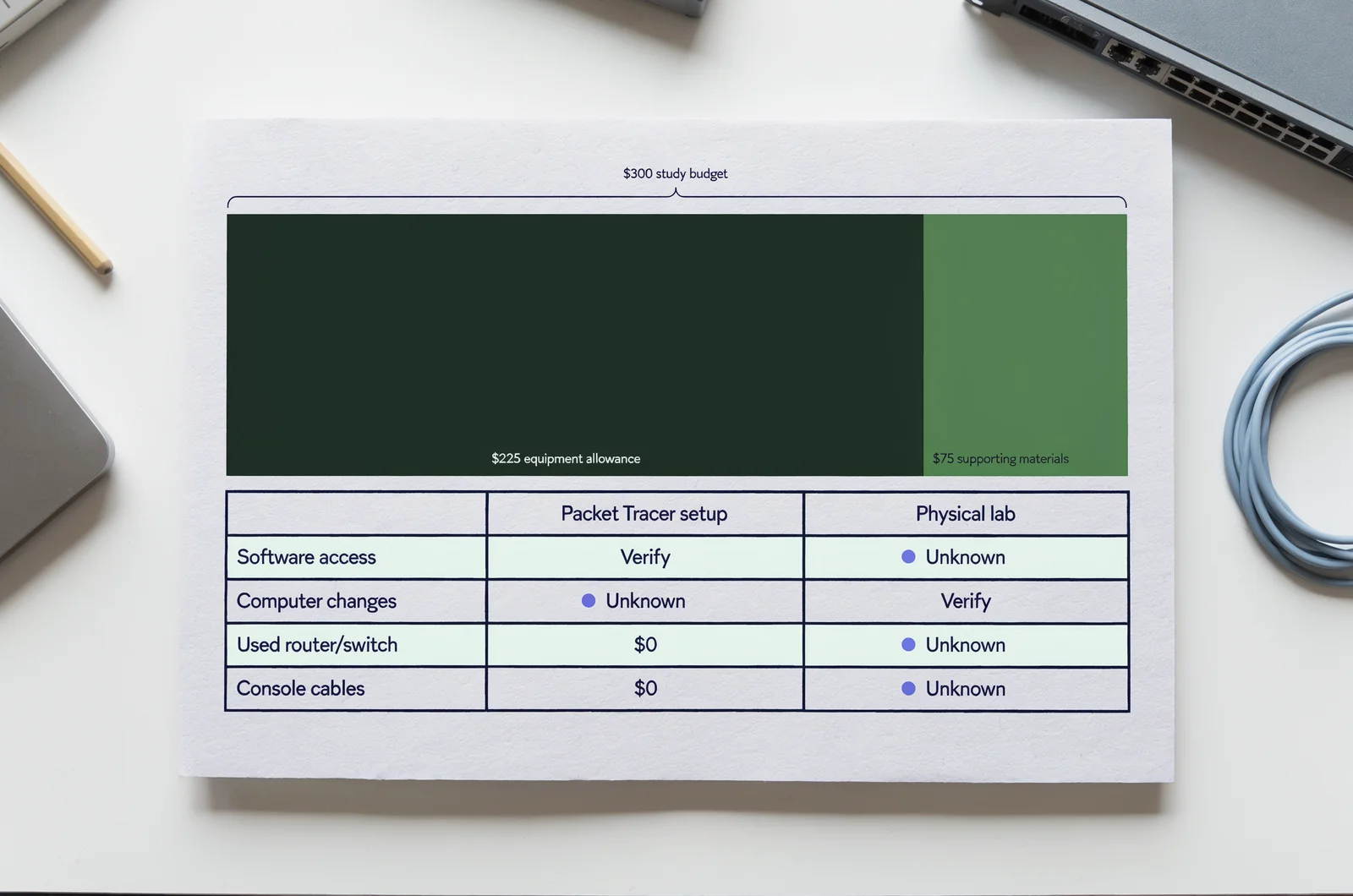
Build your own cost comparison
Create two estimates: one for your proposed Packet Tracer setup and one for the physical lab you’re considering. Enter verified amounts for your circumstances. Leave uncertain costs marked as unknown until you can confirm them.
For the software plan, check access conditions, computer requirements, and any changes your existing computer would need. Use current information for the version you intend to install.
For the equipment plan, request an itemized purchase list. Check whether your planned exercise calls for additional cables, adapters, modules, power supplies, or other accessories. Confirm shipping and return terms before calculating the total.
Suppose, purely as a budgeting example, you set aside $300 for lab preparation and reserve $75 for supporting materials. Your equipment allowance would be $225. Treat those figures as an illustration of a spending rule, rather than a market estimate.
Decide how you’ll handle an unknown cost. My preference would be to hold the purchase until that item is resolved.
Keep the comparison honest by recording what you already own. Use actual incremental spending for your decision, and note any shared equipment separately.
Give used equipment a defined purpose
Before buying a device, write the exercise it would support at the top of the purchase record. Underneath, list the capability you have verified and the evidence used to verify it.
Then set a maximum price for that purpose. Consider how much you’re willing to spend to complete that exercise through ownership, borrowing, or supervised access.
If you have access through an employer, school, or community lab, ask about permission, scheduling, and permitted configuration changes. Treat availability as something to confirm before building your study schedule around it.
For a budget-constrained candidate, I’d start with the existing computer and an objective-based Packet Tracer trial. Reconsider equipment after the trial identifies a concrete unmet need.
For someone buying equipment partly for work practice, separate that professional-development budget from the amount reserved for the exam. Give each purchase its own justification.
A useful calculator for this decision would accept verified setup costs, expected study sessions, and optional running costs, then display cost per planned session. Include an uncertainty field for unconfirmed expenses.
Write down your final spending ceiling and the conditions under which you would revise it.
3. Daily convenience: choose around the study time you can protect
For convenience, test Packet Tracer and any available physical setup against your real schedule. I’d prioritize the environment you can reliably use during the study windows you have already reserved.
Run a timed setup trial
Choose a short session, such as 25 minutes, and define one exercise before you begin. Include preparation, configuration, verification, and cleanup within that window.
Start your timer when you begin accessing the lab. Record when you start useful practice and when you complete the exercise. Repeat the trial on another day before judging the setup.
For Packet Tracer, check whether you can open the necessary files, reach the required devices, and restore a clean starting state within your allotted time.
For physical equipment, test your actual access arrangements. Include any steps needed to connect your computer, reach the devices, prepare the configuration, and leave the equipment ready for its next use.
Judge the results against your schedule. If one option fits a weekday session and another fits a weekend block, assign different exercises to those windows.
Choose a longer trial if your normal sessions are longer. The purpose is to test your plan under conditions you expect to repeat.
End each trial by writing one sentence about what prevented you from completing the intended task.
Make repetition part of the setup decision
Prepare a clean starting point and a completed example for each exercise, using whatever save or backup methods your environment supports. Confirm that you can restore the starting point before relying on it.
Keep your instructions short enough to reuse. Include the topology, intended behavior, starting conditions, and evidence required for completion.
Then repeat the exercise with a meaningful change. Use different addresses, alter a requirement, or remove a step from your notes. Choose changes that remain within the functions you have verified.
For a busy candidate, I’d favor Packet Tracer if the trial shows that it fits the available sessions and supports the intended practice. For someone with dependable equipment access and a suitable workspace, I’d judge hardware by the same completion standard.
If you choose a combined plan, give each environment a job. Reserve one for regular configuration practice and the other for named equipment exercises. Put both into the calendar.
Before the next session, record the exact file, device, or starting configuration you’ll use. Include a stopping point so you can close the session cleanly.
4. Troubleshooting practice: decide which problems you want to diagnose
For troubleshooting, choose the environment around the fault you intend to investigate. I’d separate configuration exercises from equipment-handling exercises, then judge each proposed lab by the evidence it allows you to examine.
Design a fault with a known explanation
Pick a working exercise and deliberately change one setting. Write down the change, the symptom you expect, and the evidence you plan to inspect.
For example, construct a hypothetical addressing exercise with one deliberately incorrect value. Before testing it, explain what you expect to observe and which checks would challenge your explanation.
Use a short investigation record:
- State the symptom without proposing a fix.
- List the first evidence you would inspect.
- Record what you found.
- Choose one change and explain your reason.
- Repeat the relevant checks after the change.
Complete this exercise in Packet Tracer if your installed environment supports the required behavior and outputs. Apply the same process to physical equipment where you have suitable access.
Keep uncertainty visible. If the output differs from your prediction, check your assumptions and the environment’s documented behavior before deciding what the result means.
For each fault, finish with an explanation of why your chosen correction addresses the stated problem. Remove any instruction that amounts to copying a completed answer without examining its effect.
Give physical handling its own practice goals
If equipment handling is part of your professional goal, write a separate exercise for it. Specify what you want to identify, connect, inspect, or document.
Possible goals to verify against your available equipment include locating a console connection, matching an interface to documentation, tracing an approved cable path, or checking device indicators.
Work within the equipment owner’s permission and handling instructions. Use dedicated training equipment for any deliberate disruption, and confirm the permitted scope before changing connections or settings.
I’d favor physical access when the goal explicitly requires touching and identifying equipment. For a configuration fault, choose whichever verified environment supports the exercise and the evidence you need.
Keep the purchase decision narrow. If a brief supervised equipment session satisfies the handling goal, evaluate that option before committing to ownership.
For a combined approach, write two completion records: one for explaining the configuration fault and another for performing the physical task.
Close each troubleshooting session with the observed symptom, the evidence examined, the change made, and the result you verified. Keep those notes available for a later attempt from a clean starting point.
5. Readiness assessment: choose by what you can explain independently
For the final tradeoff, I’d judge your lab choice by independent performance on defined tasks. Set the completion criteria before attempting the exercise, and assess your work against those criteria afterward.
Use a consistent completion standard
Choose an exercise from your verified objective map. Close the walkthrough and write a short plan before entering commands.
Ask yourself what behavior you intend to create, which settings you’ll change, and how you’ll check the result. After completing the exercise, compare your evidence with the original requirement.
For each attempt, answer these questions:
- What requirement did I satisfy?
- Which output supports that judgment?
- What alternative explanation should I rule out?
- What would I change if one requirement were different?
- Which part still required help?
Use those answers to select the next exercise. Repeat an uncertain task with one controlled variation, and keep the explanation beside the configuration.
Apply this standard equally to Packet Tracer and physical hardware. My recommendation is to count completed, explained tasks when deciding where to spend the next study session.
If you use ExamJungle for question practice, connect a reviewed question to a relevant lab exercise where appropriate. Write down the concept you want to examine, then check it against your objective map before adding work to the schedule.
Choose a setup with a clear review point
For a candidate focused on CCNA preparation, I’d begin with a Packet Tracer trial and review the decision after completing a representative set of planned exercises.
Continue with software as your sole lab environment if it supports those exercises and you can complete them independently. Keep reading, explanation practice, and question review in the wider study plan.
Choose physical equipment when a verified study need requires it, or when equipment handling is an explicit professional goal. Confirm the proposed device’s suitability before purchase.
Choose a combined plan when you can name a useful role for each environment. For example, assign regular configuration exercises to one setup and a scheduled handling session to the other.
Avoid attaching a pass prediction to the purchase decision. Use the review to identify what remains unpracticed, unsupported, or uncertain.
At the review point, choose one action: continue with the present setup, arrange targeted equipment access, or purchase a verified item within your budget. Record the exercise that justifies your choice.
Questions to settle before buying CCNA lab equipment
Can I use Packet Tracer as my only lab environment?
I’d make that choice conditional on your objective map and completed exercises. Verify that your installed environment supports the tasks you have selected, then attempt them without a walkthrough.
Keep a record of any unresolved limitation. Check whether it concerns the software, your configuration, or an exercise that needs revising.
Treat the result as a decision about your lab environment. Assess your wider preparation separately against the current exam objectives and the explanations you can produce.
What should I check before buying a used router or switch?
Start with the exact task you want to perform. Request the model identifier, installed software details, interface information, included accessories, and applicable licensing information.
Check those details against authoritative documentation for the proposed device. Ask about configuration access, condition, return terms, and any restrictions relevant to your intended use.
Calculate the complete purchase amount before deciding. Keep any unverified item marked as unresolved, and make your offer only after the device meets your written requirements.
Should I buy hardware shortly before my exam?
I’d introduce equipment at that stage only for a named, unresolved need. First identify the exercise you cannot currently complete and verify that the proposed device addresses it.
Review the time required to obtain, prepare, and use the equipment against your remaining study schedule. Consider borrowing or supervised access if either arrangement is available and suitable.
Keep the decision tied to one observable result: completing the previously unsupported exercise and explaining its outcome.
Plan your Cisco certification study