
To establish the AWS beta exam results release timeline for your certification, start with a notice that identifies your exact exam and explains when its results are expected. No verified certification-specific release dates are available to publish in this roundup. I therefore can’t give you a dated calendar or a standard waiting period.
You can still make a useful plan. Below, you’ll find guidance for recording your certification’s dates, interpreting different kinds of timing notices, and choosing a sensible follow-up point. Use these sections to distinguish a confirmed release date from an estimate without assuming anything about your result.
If you need a date for an employer, reimbursement request, or training deadline, keep that date provisional until you have exam-specific confirmation.
Build a release-date record for your certification
Keep a separate timing record for each certification you’re tracking. Include enough detail to identify the exam version and the announcement behind each date. Leave unsupported fields blank rather than borrowing dates from another exam.
Identify the exam before recording dates
Copy the certification name and exam code from your own registration record. If a version identifier appears, preserve it too. Then compare those details with any announcement you intend to use.
Treat a matching certification name as the beginning of verification. Check whether the announcement also identifies the exam version, beta period, or candidate group relevant to your appointment. If those details are unclear, mark the announcement as needing confirmation.
For your personal record, capture:
- The certification name, exam code, and version shown on your registration.
- Your appointment date.
- The beta opening and closing dates, if documented.
- The expected results date or window, if documented.
- The announcement’s publication date and any subsequent update.
Keep your appointment date separate from the beta closing date. When interpreting a waiting period, use the starting event specified in the notice rather than choosing one yourself.
Preserve the wording behind the expected date
Alongside the expected release date, save the notice’s exact timing language for your own reference. Record whether it names a particular day, gives a range, identifies a target month, or describes a period after another event.
Add a short status beside the entry: confirmed date, published estimate, awaiting clarification, or no date recorded. These are organizational labels for your notes, not claims about how AWS categorizes announcements.
If you calculate a calendar date from a relative window, label it as your calculation. Preserve the original wording beside it so you can revisit the arithmetic or starting point.
For a certification with no verified notice, write release timing unconfirmed. That gives you a clear research task without presenting a guess as a result.
Match the results notice to its timing language
Choose the interpretation below that matches the announcement for your certification. These are reading scenarios, not descriptions of verified AWS announcements. Apply a scenario only when your own notice contains the relevant information.
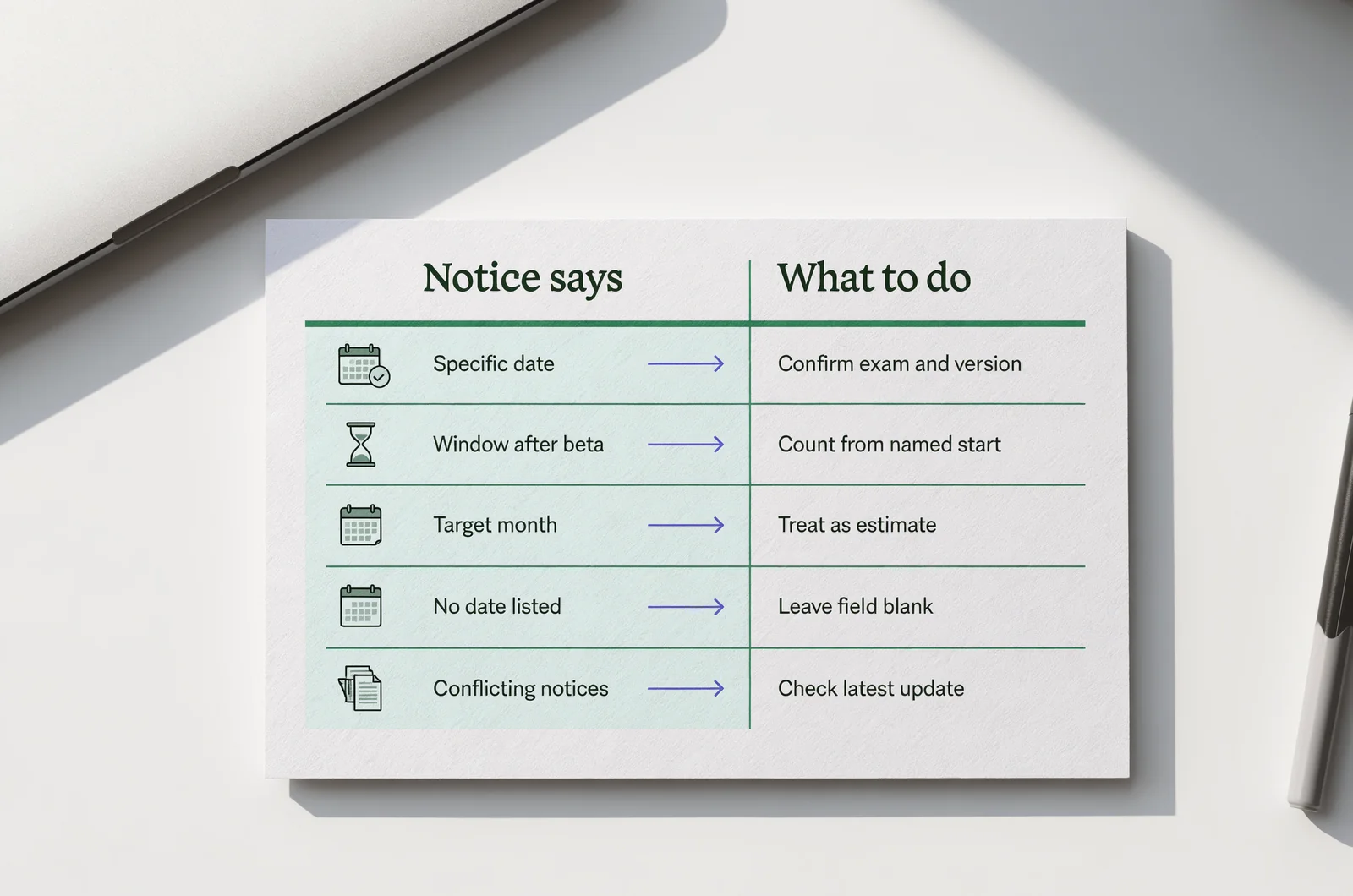
When the notice names a specific release date
Use this approach when a notice explicitly connects a calendar date with results for your exam.
First, check what the date describes. Look for language about exam results rather than registration, testing availability, or another milestone. Then verify the certification and version against your registration details.
Record the date as stated. If a time or time zone appears, preserve it. If neither appears, avoid adding your own assumption about midnight or the beginning of the business day.
For planning purposes, distinguish between a date on your calendar and a result you have received. If you’re coordinating with a manager, describe the date as the published expectation until your outcome is available.
Your follow-up point should reflect the whole stated period. Where the wording leaves room for interpretation, ask for clarification rather than choosing the earliest possible moment.
For practice during the wait, choose one topic you want to understand better and review the reasoning behind your answers.
When the notice gives a window after the beta closes
Use this approach only when the notice explicitly ties results timing to the end of the beta period.
Record the closing date and the relative window together. Before calculating an expected date, check whether the wording specifies calendar days, business days, weeks, or another unit. Preserve any qualification attached to the window.
Do not substitute your appointment date for the stated starting event. If you cannot establish the relevant beta closing date, leave your calculated release date unresolved.
Where a later announcement changes the closing date, check whether it also updates results guidance. Ask for confirmation if the relationship between the two dates is unclear.
This scenario calls for a calculation you can explain: the documented starting event, the published interval, and the resulting estimate. Label the estimate accordingly.
For practice, select a small set of questions aligned with a domain you want to revisit. Write down why you accepted or rejected each answer.
When the notice identifies a target month or broad period
Use this approach when the wording gives a general expectation rather than a particular day.
Keep that level of precision in your notes. A target month should remain a target month. Avoid converting it into the first day, middle, or final day of that month without supporting language.
For an employer update, use equally careful wording. State that you’re awaiting the result and identify the published period, if you have verified one. Leave the completion date open.
Set a personal reminder to review the notice during that period. Treat this as your checking schedule rather than a prediction about when results will appear.
If the period ends without clarification, use the original announcement when preparing your inquiry. Ask whether the expectation has changed.
For practice, choose a manageable review session around your other commitments. Decide its length in advance so the waiting period doesn’t become an open-ended study obligation.
When no results date is documented
Use this approach when you have registration details or testing dates but cannot establish a results window.
Keep those known details in your record, but leave the results field unconfirmed. Avoid filling the gap with a date from a different certification, a different beta period, or an undated discussion.
Prepare a focused inquiry that identifies your exam and asks whether an official results window has been announced. Include your appointment date and the relevant notice, if one exists.
Until you receive clarification, avoid scheduling a result-dependent milestone as though the date were settled. For a training plan, record the exam appointment as completed and the outcome as pending.
Your limitation here is specific: you lack confirmed timing. Keep that separate from any judgment about your performance.
For practice, choose a topic you want to retain for work or future study. Avoid building an intensive retake schedule around an outcome you haven’t received.
When two notices appear to conflict
Use this approach when you find different dates or windows attached to what appears to be the same exam.
Compare the certification name, code, version, and beta period before comparing publication dates. Check whether one notice concerns a different milestone or candidate group.
If both appear relevant, look for wording that explicitly revises or replaces earlier guidance. A newer publication date alone should prompt a closer check rather than an automatic conclusion.
Save both notices and describe the disagreement precisely. For example, identify whether the conflict concerns the beta closing date, the results window, or the event from which a waiting period begins.
Ask which notice applies to your appointment. Until that is clear, keep your planning date provisional.
For practice, continue with your existing review priorities rather than changing course every time you encounter another date.
Separate results timing from other exam dates
Keep each date attached to the event it describes. When reading an announcement, identify the milestone before using it to estimate when you’ll receive your outcome.
Label registration, testing, and results separately
In your notes, give registration opening, beta testing, and results release their own fields. Enter a date only where the announcement supports that label.
If a page mentions several milestones, read the surrounding sentences before copying anything into your calendar. Check which certification and version each date belongs to, especially when an announcement discusses more than one exam.
Use the same discipline with a general exam availability date. Do not enter it as a beta results date unless the notice explicitly connects the two.
For historical announcements, record the year prominently. If you keep an old example for context, mark it as historical and exclude it from your current planning calculation.
Before sharing a date, complete this sentence in your own notes: this announcement connects this exam version with this event on this date.
Keep your result separate from later administrative tasks
Organize your plan around the information you actually need. If your employer requires a particular document, ask what document will satisfy that requirement.
Then check the instructions associated with your result rather than assuming every administrative task has the same timing. Where separate steps or dates are stated, record them separately.
For a reimbursement request, preserve the appointment confirmation and any documents your employer requests. Keep your personal planning deadline distinct from the expected results date.
Once a report is available, the guide to an AWS diagnostic score report is a relevant companion for reviewing it. Check the report’s own explanations before drawing conclusions from individual fields.
Use the outcome and accompanying instructions to decide which administrative task comes next.
Keep studying without assuming a retake
Choose a study plan that serves your goals while the outcome remains unresolved. I’d separate light review from any decision to prepare for another attempt.
Set a small, deliberate review routine
Start with a topic you want to understand better. Use your own study notes, the applicable exam guide, or a question you found difficult during preparation to choose that topic.
Avoid trying to reconstruct the exam. Write down the concept you want to review and the explanation you want to produce in your own words.
For each practice question, ask yourself what requirement determines the answer. Explain why you chose it and why you rejected the alternatives. If you’re uncertain, identify the part of the explanation that needs more work.
You might choose a short practice session followed by a focused review of a few answers. Treat that schedule as a personal choice, not a prescription tied to the results window.
If you’re comparing resources, use the AWS practice exam comparison as a starting point for questions about scope and format. Check the supporting evidence behind any performance claims before relying on them.
Choose practice for the version you intend to study
Before selecting a resource, check which certification and version it names. Compare its stated coverage with the exam guide relevant to your goal.
If you use ExamJungle during the wait, apply the same checks. Choose practice for your intended exam and make understanding the answer your purpose for each session.
Keep a brief review log. Record the topic, the reasoning you found difficult, and the explanation you can now give. Use that log to choose your next session rather than repeatedly starting from the beginning.
If you’re considering another certification, review its objectives before committing to a new study plan. Keep that decision separate from speculation about your pending outcome.
Avoid booking another attempt purely to settle uncertainty. Wait for your result, then verify the requirements that apply to your situation. If another attempt becomes relevant, consult the AWS retake scheduling guide and confirm current conditions before paying.
Follow up when your expected window has passed
Base a follow-up on the notice applicable to your certification. Identify the expectation you were given and explain what remains unresolved.
Assemble a concise inquiry
Check the account or notification channel named in your exam instructions before contacting anyone. Review the timing notice again for qualifications, updates, and any instructions about inquiries.
Prepare a short message with your certification name, exam code, version if shown, and appointment date. Identify the announcement you’re using and the date or window you understood from it.
State whether you need clarification about the expected release period or help locating an outcome that should already be available under that guidance. Keep those questions distinct.
Avoid including passwords, payment information, or unnecessary personal documents. Use the contact route identified in your exam materials, and provide additional information only as requested through that route.
If you have no published window, say so directly. Ask whether timing has been announced rather than describing the result as overdue.
Keep a copy of your inquiry and any response with your exam record.
Update your plan from the response
When you receive a reply, separate a new estimate from a confirmed instruction. Preserve the wording and note which exam or appointment it applies to.
If the response requests another action, complete that action before deciding whether further follow-up is needed. If it gives a revised checking date, add that date to your record.
For work or reimbursement planning, communicate only what you can support. You can report that you completed the appointment and are awaiting the outcome without supplying an estimated certification completion date.
An optional personal tracking tool could help here: enter the exam identifier, documented timing language, starting event, and your chosen reminder date. Leave the results estimate blank whenever the announcement provides insufficient information.
Such a tracker should organize your records, not predict AWS decisions. Keep the original notice available beside every calculated date.
Questions to resolve while you wait for your result
Use these questions to check assumptions before changing your study schedule, contacting support, or giving someone a completion date.
Should I count from my appointment or the beta closing date?
Use the starting event explicitly named in the notice for your exam. If it names neither event clearly, ask for clarification before calculating a deadline. Keep both dates in your notes so you can explain the distinction in your inquiry.
Can I use another certification’s waiting period?
Avoid using it as the expected window for your own exam. Seek guidance that identifies your certification, version, or beta period. If you keep another exam’s timeline for background, label it as a separate example and exclude it from your calendar calculation.
Should I infer my result from the length of the wait?
Do not use elapsed time to assign yourself a pass or fail outcome. Keep your status pending until you receive an outcome through the designated channel. Base any follow-up on the published timing guidance rather than an interpretation of your performance.
What if someone else says their result has arrived?
Check your own designated channel and the notice applicable to your appointment. Avoid assuming that another person’s post establishes your release date. If you need clarification, identify your own exam details and ask which timing guidance applies.
How should I describe the exam on a work update?
Describe the stage you can document. If you completed the appointment and are awaiting the outcome, say that. Follow your employer’s documentation requirements before reporting an awarded credential or submitting a result-dependent reimbursement request.
What should I review once the outcome arrives?
Start with the outcome and its accompanying instructions. If you continue studying, use the report’s own explanations and the applicable objectives to choose topics. Verify any scheduling conditions before arranging another attempt, and keep your review plan tied to the exam you intend to take.
Plan your AWS study around the outcome