

I’d build your Google Cloud certification validity and recertification timeline around your exact credential: confirm its expiration date, identify the applicable renewal route, and plan an attempt with room to address a setback. Use this walkthrough to organize those decisions, prepare for the appropriate assessment, and check your credential record afterward.
Confirm the actual validity period and renewal requirements against Google’s current instructions for your certification. Before applying a two-year term, a particular booking window, or an old registration process, verify that it applies to the credential you hold.
Keep the policy details beside your calendar throughout. Treat the study schedule below as a planning recommendation, and enter official requirements only after confirming them.
1. Find the dates attached to your credential
Begin your Google Cloud renewal plan by recording the credential’s exact name, current status, and expiration date. Keep each certification on its own line if you hold several.
Collect the credential record
Open the account associated with your certification and locate the credential details. Copy the full certification title rather than relying on an abbreviation in an old study folder.
Record these items together:
- The certification name exactly as displayed.
- The account email associated with the credential.
- The credential identifier, if displayed.
- The issue date and expiration date.
- The current status shown in the record.
Save a dated copy for your planning notes. If your employer tracks certifications, compare its recorded expiration date with the date in your credential account.
Resolve any mismatch before building the schedule. For example, if your employer’s spreadsheet and your credential record show different dates, ask the appropriate support contact to clarify the discrepancy. Keep both records available until you receive an answer.
Confirm the applicable validity period
Read the current certification-specific requirements and confirm the validity period that applies to your credential. Check for any stated conditions tied to issue dates, certification versions, or program changes.
Keep your existing expiration date separate from the validity period that would apply after renewal. Verify both before calculating a future deadline.
Then check whether an eligibility window applies. If one is specified, record its opening date and determine whether the restriction concerns registration, taking the assessment, or another action.
Your completed note should answer three questions: when does this credential expire, when may you renew it, and which instructions establish those dates? Leave uncertain fields marked for confirmation instead of filling them from memory.
2. Confirm the renewal route before budgeting
For your Google Cloud credential, identify the accepted renewal action before choosing study materials or paying an exam fee.
Establish what you need to complete
Read the renewal instructions alongside the page for the assessment you intend to take. Check whether the applicable route requires a particular exam, a renewal-specific assessment, or another stated action.
If several options appear, compare their eligibility requirements and scope. Choose only a route that explicitly applies to your credential and current status.
Write the selected route in one sentence: “To renew this credential, I need to complete ___ while meeting ___.”
Verify the details around that sentence:
- The exact assessment or activity name.
- Any eligibility conditions.
- The required completion deadline.
- The available delivery methods.
- Any limits on repeated attempts.
Avoid substituting a similarly named certification or assuming that completing a different cloud credential satisfies the requirement. Confirm the relationship explicitly before including it in your plan.
Check the full cost and timing conditions
Inspect the current fee for your chosen route. Confirm the currency, applicable taxes, and any renewal discount shown for your account.
If you have an employer voucher or reimbursement arrangement, verify its expiration date and eligibility conditions before choosing an appointment. Ask your employer which receipts or completion records it needs.
Read the cancellation, rescheduling, and retake conditions before payment. Record the exact deadlines and waiting periods that apply; don’t supply a familiar interval from another certification program.
Budget separately for your planned attempt and any optional preparation resources. If you want financial room for another attempt, include that amount as a contingency rather than treating it as a required expense.
Before moving on, check that your selected route, eligibility, fee, and timing conditions all refer to the same certification.
3. Work backward from your expiration date
Build your Google Cloud renewal calendar from verified boundaries, then add study time around your own availability.
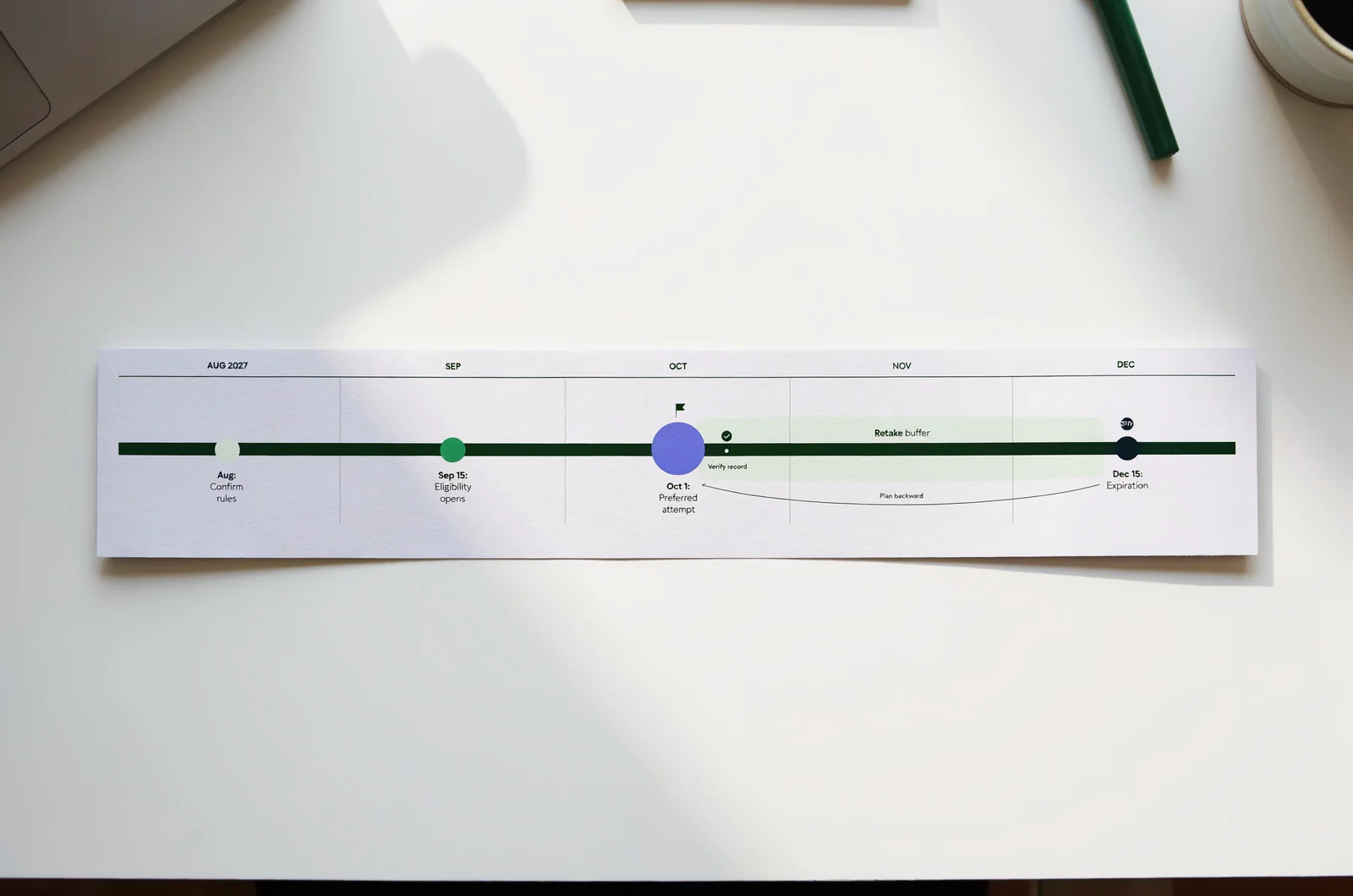
Choose an attempt date with room to respond
I’d choose a preferred first-attempt date before the final permitted day, subject to the applicable eligibility rules. Decide how much room you want for further preparation, another eligible attempt, or resolving an account problem.
First, block out travel, work deadlines, and other dates when you cannot realistically study or attend an appointment. Then check the registration calendar for suitable availability.
Use the applicable retake rules when judging your remaining options. Before counting on a second attempt, confirm both the required interval and your eligibility to take it before the relevant deadline.
Keep separate calendar entries for the eligibility opening, preferred attempt, rescheduling deadline, and credential expiration. Add preparation sessions around those entries.
If your preferred appointment leaves no workable fallback, reconsider the date or reduce other commitments. Don’t treat an unverified extension as part of the schedule.
Use a hypothetical calendar to check your logic
For illustration, suppose your credential expires on December 15, 2027, and the applicable instructions permit a renewal attempt from September 15. These dates are hypothetical.
You might plan to:
- Confirm the rules and account details during August.
- Begin focused review before the hypothetical September eligibility opening.
- Choose October 1 as a preferred first-attempt date.
- Preserve later dates only after checking the applicable retake conditions.
- Verify the updated credential record after successful completion.
Replace every date with your own verified details. Adjust the study period around the topics you need to review.
A useful interactive renewal planner would accept your expiration date, eligibility opening, applicable retake interval, and unavailable dates. It could flag proposed appointments outside those boundaries. Keep its policy fields editable and distinguish suggested study dates from verified requirements.
Finish by checking every calendar entry against the certification instructions.
4. Match your study plan to the selected exam
Prepare for the assessment attached to your Google Cloud renewal route. Start with its current published scope before deciding how much material to revisit.
Build a focused topic list
Open the applicable exam guide and save its title, version, or publication date where available. Compare its topics with the materials you already own.
Review each listed area and assign yourself one of three actions: explain it without notes, investigate a specific uncertainty, or rebuild the topic from the beginning.
Be precise about the uncertainty. Instead of writing “review networking,” write a question you need to answer, such as how to select an appropriate connectivity approach for a stated requirement. Use the guide to decide whether that question belongs in your preparation.
For Associate Cloud Engineer preparation, use ExamJungle’s Associate Cloud Engineer practice alongside your topic list. Compare the material you select with the applicable exam guide before adding it to your schedule.
If you’re preparing for Professional Cloud Architect, apply the same check to a Cloud Architect practice exam. Keep the credential name and selected assessment visible at the top of your notes.
Turn weak areas into concrete study tasks
Give each review session a defined output. For a scenario question, aim to explain the requirement, choose an approach, and justify the decision.
Try this review sequence:
- Describe the problem in your own words.
- Identify the stated constraints.
- Explain why you selected an answer.
- Describe the change that would make another answer appropriate.
Check technical explanations against the relevant documentation before keeping them in your notes.
For Cloud Digital Leader preparation, align your Cloud Digital Leader questions with that credential’s own published scope. Choose review tasks from that scope instead of borrowing another credential’s outline.
End each session with a specific follow-up task. Write “compare the documented approaches for this requirement” rather than “study more,” and assign the task a place in your calendar.
5. Turn practice results into a booking decision
Use practice during your Google Cloud renewal preparation to decide what needs attention before your planned attempt.
Review the reasoning behind each answer
Take a timed practice session without opening notes. Choose timing that matches your preparation goal, and label it as a practice setting rather than an official exam requirement.
During review, revisit incorrect answers and any correct answers you selected with uncertainty. For each one, record the topic, your reasoning, and the point that needs checking.
Try an error log with these fields:
- The topic named in the applicable guide.
- The requirement you overlooked or misunderstood.
- The reason you chose your answer.
- The explanation or documentation to revisit.
- The task you will complete before trying another question.
In an ExamJungle Cloud Database Engineer practice session, use this log to organize your review. After checking an explanation, close it and restate the reasoning yourself.
Set a personal readiness check
Choose your booking criteria before reviewing the next practice result. You might require yourself to explain each assessed topic, complete a timed session, and resolve recurring errors.
Apply the same routine to an Associate Data Practitioner practice exam if that matches your selected credential.
Keep your personal criteria separate from any official passing standard. Avoid converting a practice percentage into a prediction of the real outcome.
If you remain uncertain, compare your remaining study tasks with your available preparation time. Check the applicable rescheduling deadline before deciding whether to move an appointment.
Write down the reason for your decision: proceed with the planned date, complete another focused review, or select a later eligible appointment.
6. Book through the current registration route
Register for your Google Cloud renewal assessment through the route specified in the current instructions for your exact certification.
Verify the account and assessment
Follow the registration link from the applicable certification instructions. If that route leads to Webassessor, continue there after checking the account details. Confirm the current route before reusing an old bookmark.
Locate the account associated with your existing credential. If you cannot access it, investigate account recovery before creating another profile.
Read the displayed name requirements and compare your profile with the identification you intend to present. Resolve discrepancies before paying.
Then inspect the selected assessment’s full name. Confirm that you have chosen the intended renewal route, language, delivery method, and eligible date.
Check the appointment’s time zone carefully. Add the displayed start time and time zone to your calendar, then verify how your calendar converts it to local time.
Before submitting payment, review the selected assessment and appointment details one more time.
Complete the delivery checks before the appointment
For a remote appointment, follow the published equipment, connection, room, identification, and check-in requirements. Complete any required system check using the computer and connection you plan to use.
For an in-person appointment, confirm the center address, arrival instructions, identification requirements, and travel arrangements.
Read the rules about permitted materials, breaks, personal items, and assistance. Note any question that requires clarification and resolve it through the appropriate support route.
Save the booking confirmation and payment receipt. Add a reminder before the applicable rescheduling deadline so you can reassess your preparation while that option remains available.
Your final booking check should cover the assessment name, date, time zone, delivery method, account identity, and required preparation for admission. Open the confirmation directly and compare each field with your plan.
7. Complete the assessment and verify the renewal
After your Google Cloud renewal attempt, check both the assessment outcome and the credential record before closing the task.
Keep the result and credential details together
Follow the applicable instructions for receiving your result. If the outcome remains pending, save the notice and record any stated follow-up period.
Once completion is confirmed, open the account containing your certification. Check the credential name, current status, and displayed expiration date.
Compare the updated record with the renewal requirements you verified earlier. If a detail is unclear, request clarification before calculating the next renewal deadline.
Save the completion confirmation with your earlier credential record. Keep payment receipts separately if you need them for reimbursement.
If you maintain a public credential link or employer training record, review it after confirming the updated details.
Set up the following renewal cycle
Create your next calendar entry from the expiration date actually displayed after renewal. Confirm the applicable eligibility rules before adding a future booking reminder.
Choose an earlier personal reminder to review the requirements again. Label it as a planning date so you can distinguish it from an official deadline.
If you hold multiple Google Cloud credentials, check and update each record individually. Confirm any claimed renewal relationship between credentials before changing several dates.
When the record does not match the expected outcome, contact the relevant support team with the credential identifier, assessment details, and confirmation records requested through its official process. Keep the issue open until you receive clarification.
Resolve the renewal questions that could change your plan
Use these checks when an uncertainty affects your Google Cloud renewal date, preparation, or registration.
What if my credential has already expired?
Check the current instructions for expired credentials before selecting an assessment. Identify the route that applies to your present status, including any eligibility and fee conditions.
Rebuild the calendar around that route. Confirm the current scope of the required assessment before deciding which study materials to reuse.
If you need an active credential by a work deadline, communicate the unresolved status and your planned action accurately.
Does renewing one certification renew my others?
Verify that relationship explicitly in the applicable requirements. Check each credential record before updating its expiration date in your calendar or employer’s system.
If you cannot find a clear answer, ask the certification support team a precise question. Include the names and current statuses of the credentials involved, and request clarification about the proposed renewal action.
Can I keep using my original study materials?
Compare them with the current guide for your selected assessment. Mark the sections you can retain, the explanations you need to recheck, and the topics requiring new material.
Inspect familiar notes with the same care as unfamiliar ones. For each topic, ask yourself to explain the decision and identify the documentation that supports it.
Keep useful material in the plan after that check. Replace or revise anything you cannot reconcile with the applicable scope.
What if I need to move my appointment?
Open your confirmation and check the current rescheduling conditions before making a change. Compare the proposed replacement date with your eligibility boundaries and credential expiration.
After changing the booking, save the new confirmation and remove the old calendar entry. Recheck the time zone, delivery method, and any admission instructions attached to the replacement appointment.
Strengthen your renewal and practice routine